Large Projection Surface for the Infra Range System
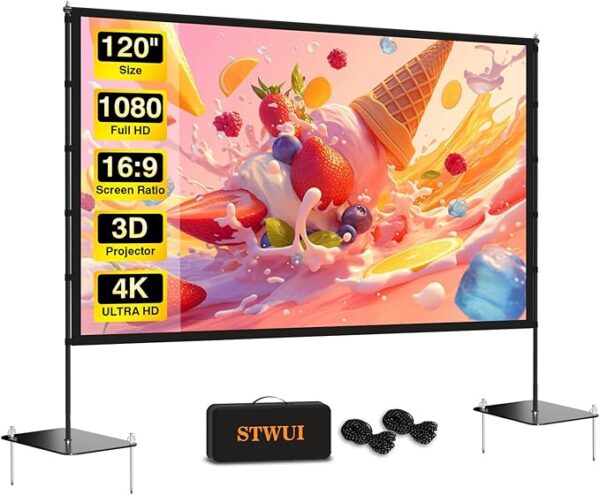
The Recommended 120-Inch Projector Screen provides a large 16:9 display surface for Infra Range targets, drills, training environments, game modes, and system demonstrations.
Within an Infra Range setup, the projector displays the application on the screen while a compatible smartphone observes the projected training area through the infrared filter system.
The freestanding frame allows the screen to be used without permanently mounting hardware to a wall. When training is complete, the frame and screen can be disassembled and stored in the included carrying bag.
How It Works
Assemble the frame according to the manufacturer’s instructions and attach the projection material securely to the support structure.
Place the screen on a stable, level surface with enough open space in front of it for the projector, smartphone tripod, and training area.
Position the projector so the Infra Range image fills the desired portion of the screen without extending beyond its edges.
Mount the compatible smartphone where its camera can observe the projected area, attach the infrared filter system, and complete the Infra Range calibration process.
Recommended Use
This projection screen is recommended for:
- Infra Range home training setups
- Large projected targets and drills
- Infrared dry-fire gameplay
- System setup and calibration
- Product demonstrations
- Family recreation and simulated training
- Temporary indoor training areas
- Portable event or trade-show demonstrations
Screen Size and Space Requirements
The listed screen size is 120 inches measured diagonally in a 16:9 aspect ratio.
The Amazon listing identifies the product at approximately 108 inches wide and 78.5 inches high when assembled. Allow additional room around the screen for the support frame, floor stands, projector placement, cables, and safe movement.
Measure your room before ordering. The screen may be too large for smaller rooms, apartments, narrow basements, or spaces with low ceilings.
Projection Compatibility
The screen is intended for use with standard compatible projectors and supports both front and rear projection.
For a typical Infra Range setup, the projector is positioned in front of the screen. The required projector distance depends on the projector’s throw ratio, zoom capability, resolution, and image settings.
The screen itself does not create or improve projector resolution. Image brightness, contrast, sharpness, and color depend primarily on the projector, room lighting, viewing angle, projected image size, and setup.
Complete Infra Range Setup Requirements
A complete Infra Range setup normally requires:
- A compatible iPhone or Android device
- The Infra Range mobile application
- A compatible projector
- A compatible video-output cable or adapter
- A stable phone tripod or mounting system
- A compatible infrared lens filter
- A compatible phone filter clip
- A compatible infrared training laser
- A safe indoor training area
- Electrical power for the projector
The projector screen does not include the projector, smartphone, Infra Range app, phone tripod, cables, filter system, or infrared training equipment.
Assembly Instructions
- Choose a flat, stable area with enough clearance for the complete screen.
- Remove the frame, screen material, supports, and accessories from the carrying bag.
- Assemble the metal frame according to the manufacturer’s instructions.
- Attach the screen material evenly to the frame.
- Install the floor supports and confirm that all frame connections are secure.
- Use the supplied outdoor anchoring accessories when appropriate and permitted.
- Confirm that the screen is stable before positioning the projector or beginning training.
Do not force frame connections or pull excessively on the projection material during assembly.
Positioning for Infra Range
Place the screen where the entire projected area can be observed by the smartphone camera.
Avoid positioning the screen directly in front of bright windows, mirrors, reflective surfaces, or strong room lighting that may reduce projected-image contrast or create infrared reflections.
Keep the smartphone tripod and projector clear of walkways. Route all cables so they do not create tripping hazards within the training area.
Screen Material
The Amazon listing describes the projection surface as a foldable and washable fabric designed to resist wrinkles and support high-resolution projection.
Some temporary folds or creases may be visible after the screen has been stored. Allow the screen material to hang under even tension before use.
Follow the manufacturer’s cleaning and care instructions. Avoid using harsh chemicals, abrasive tools, or excessive heat on the projection material.
Front and Rear Projection
The screen is advertised as supporting both front and rear projection.
For front projection, the projector and viewer are positioned on the same side of the screen.
For rear projection, the projector is positioned behind the screen. Rear projection requires sufficient clearance behind the screen and may produce different brightness and image characteristics depending on the projector and room.
Most Infra Range home setups will use front projection.
Indoor and Outdoor Use
The screen may be used indoors or outdoors when properly assembled and secured.
For Infra Range training, indoor use is recommended because room lighting, wind, weather, uneven ground, and environmental movement can affect screen stability, projection visibility, calibration, and infrared detection.
Never use the screen outdoors during high winds, rain, lightning, or other unsafe weather conditions.
Portability and Storage
The frame and screen can be disassembled and stored in the included carrying bag.
Make sure the screen is completely clean and dry before folding and storing it. Store all components in a cool, dry location away from sharp objects, excessive heat, moisture, and direct sunlight.
What Is Included
- One 120-inch projection screen
- Freestanding metal support frame
- Floor support components
- Outdoor anchoring accessories when supplied by the seller
- Carrying and storage bag
- Manufacturer instructions
Package contents and accessory designs are controlled by the Amazon seller and should be confirmed on Amazon before purchasing.
What Is Not Included
- Projector
- Smartphone or tablet
- Infra Range mobile application
- USB-C to HDMI cable or video adapter
- Phone tripod or mount
- Infrared lens filter
- Phone filter clip
- Infrared training laser or training pistol
- Infra Range Complete Starter Kit
Performance Notes
Projection quality depends on the projector, image size, throw distance, room lighting, focus, keystone correction, screen tension, and viewing position.
For stronger contrast and more visible targets, reduce unnecessary room lighting and prevent direct light from striking the screen.
A larger projected image generally requires more projector brightness than a smaller image. The full 120-inch surface does not need to be filled if your projector or room performs better at a smaller image size.
Care and Maintenance
- Handle the screen material with clean, dry hands.
- Do not place sharp objects against the projection surface.
- Do not drag the screen frame across finished floors.
- Check frame connections before every use.
- Clean the projection material only according to the manufacturer’s directions.
- Allow all components to dry before placing them in the carrying bag.
- Keep the screen away from open flames and excessive heat.
Amazon Purchase and Fulfillment
This product is sold through a third-party Amazon listing. Product pricing, availability, seller information, delivery estimates, package contents, warranties, returns, and customer service are determined by Amazon and the applicable seller.
Review the current product dimensions, package contents, seller information, and return terms carefully on Amazon before completing your purchase.
Affiliate disclosure: As an Amazon Associate, Infra Range earns from qualifying purchases at no additional cost to you.
Important Safety Notice
- Confirm that the frame is completely assembled and stable before use.
- Do not allow children to climb, pull, hang from, or play on the screen or frame.
- Keep the screen away from open flames, heaters, and other heat sources.
- Do not use the screen outdoors during unsafe weather or high winds.
- Secure outdoor installations using appropriate anchoring methods.
- Keep stands, cables, and projector equipment out of walking paths.
- Never use live ammunition with the Infra Range system.
- Use all equipment only in a safe, lawful, and controlled environment.
Reviews
There are no reviews yet.