Recommended Projector for the Infra Range Detection System
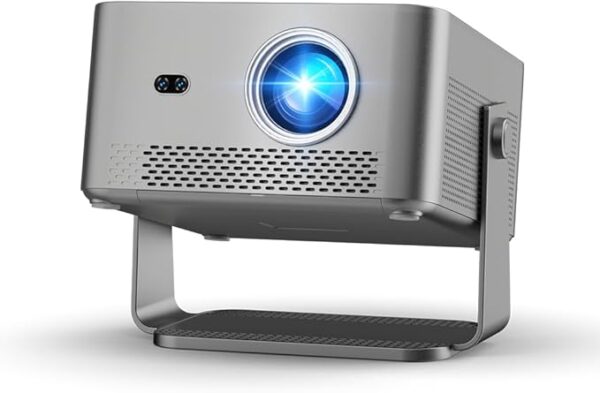
The Recommended Projector is used to display the Infra Range training environment onto a projection screen during calibration and gameplay. It creates the interactive target area observed by the Infra Range mobile application.
When combined with a compatible smartphone, infrared filter, tripod, and infrared training laser, the projector becomes the display component of the complete Infra Range training system.
How It Works
Connect the projector to a compatible smartphone or video-output device using a supported HDMI connection.
The projector displays the Infra Range targets, drills, and game environments onto a projection screen while the smartphone camera observes the projected image through the compatible infrared filter.
Compatible infrared laser impacts are detected by the Infra Range application and registered in real time.
Recommended Use
This projector is recommended for:
- Infra Range setup
- Interactive dry-fire training
- Target projection
- Calibration
- System testing
- Indoor practice
Compatibility Requirements
A complete Infra Range setup normally requires:
- Compatible iPhone or Android smartphone
- Infra Range mobile application
- Compatible USB-C to HDMI adapter (if required)
- Compatible HDMI cable
- Projection screen
- Compatible infrared lens filter
- Compatible phone filter clip
- Phone tripod or mount
- Compatible infrared training laser
- Safe indoor training area
Important: Verify your smartphone supports external video output before purchasing. Some mobile devices may require different adapters or may not support HDMI output.
Installation
- Place the projector facing the projection screen.
- Connect power to the projector.
- Connect the projector to your smartphone using a compatible HDMI adapter and cable.
- Select the correct HDMI input.
- Adjust focus and screen size.
- Position the smartphone on its tripod.
- Complete Infra Range calibration.
A darker training room generally provides better projected image quality.
Performance Notes
Projection brightness, image sharpness, and overall visibility may vary depending on room lighting, projection distance, screen material, and projector settings.
For best Infra Range performance, use the projector in a dim or dark room with the projection screen positioned away from direct sunlight.
What’s Included
- One projector
- Power adapter
- Remote control (if included by Amazon seller)
- User documentation (if included)
Package contents are determined by the Amazon seller.
What Is Not Included
- Smartphone
- Infra Range mobile application
- USB-C to HDMI adapter
- HDMI cable (unless stated by Amazon seller)
- Projection screen
- Phone tripod
- Infrared filter
- Phone filter clip
- Infrared training laser
- Infra Range Complete Starter Kit
Amazon Purchase and Fulfillment
This product is sold through a third-party Amazon listing. Product pricing, availability, seller information, delivery estimates, package contents, warranties, returns, and customer service are determined by Amazon and the applicable seller.
Review the product specifications carefully before completing your purchase.
Affiliate disclosure: As an Amazon Associate, Infra Range earns from qualifying purchases at no additional cost to you.
Important Safety Notice
This projector is intended for lawful dry-fire training, simulation, system testing, and entertainment.
Never use live ammunition with the Infra Range system. Remove all live ammunition from the training area before beginning.
Do not look directly into the projector lens while it is operating.
Keep the projector on a stable surface with adequate ventilation and away from flammable materials.
Use all equipment only in a safe, lawful, and controlled environment.
Reviews
There are no reviews yet.